



Before starting make sure to read the articles VPN Quickstart and Setup VPN.
How to install OneClick for iOS or Android.
1. From Choose APP button, Select OneClick for iOS or OneClick for Android.

2. install the APP
-
Click the icon to download the latest version of the OneClick APP!
- Click Copy Link Button.

3. Open Onclick installed APP from your iOS or Android device. Click + Add Server.

4. From the bottom of the Add Server, Click on Add Subscription.

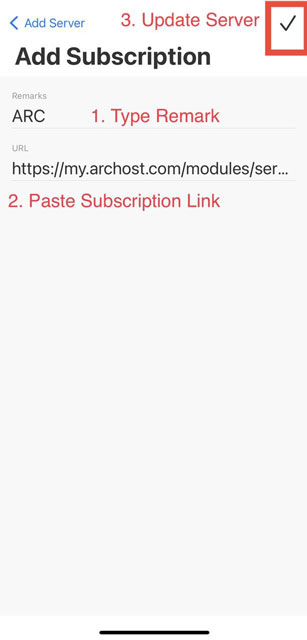
5. In Add Subscription:
- Remarks ( Type your remark #example: ARC)
- URL: Paste Coped Link from the Connection info Section (Step 2.2)
- Update Server: Click the Tick icon on the top right.

6. From home, you can choose the location from the server list. Click the server name to make it default.


7. Connect VPN
- Set Proxy Mode to GLOBAL.
- Connect to VPN.


8. We continuously update our server, to get the latest servers please Update your Subscription link frequently. From the Settings Menu, Click Subscriptions, and Update the Remarked Link.